





Quick answer
Ceiling fan wobble is almost always caused by loose blade or downrod hardware, a bent blade iron, uneven dust, or a mounting box that is not fan-rated and is moving. Humming usually means a dimmer or incompatible speed control, clicking means a loose screw, and a fan that runs slow or only on one speed typically has a failing capacitor. Tighten, clean, balance and check the box before buying parts.
A ceiling fan wobble is the complaint we hear most about fans in Katy and Pearland homes, usually followed by a hum that started when someone replaced the wall switch, or a bedroom fan that now runs on high or not at all. All three problems have mechanical or electrical causes you can narrow down from the floor in about ten minutes, and most of the fixes cost nothing but time.
This post goes through wobble, noise and speed faults in that order, explains the balancing method that works, covers fan speed controls and the wiring behind them, and marks the point where a problem becomes a job for our ceiling fan installation and repair service.
Key Takeaways
- Most ceiling fan wobble comes from loose blade screws, an unseated downrod ball, a bent blade iron or dust, in that order.
- A fan that wobbles because the ceiling box moves is a falling hazard; stop using it until the box is replaced with a fan-rated one.
- Balance a fan by cleaning, tightening, measuring blade heights, then using the clip-and-weight kit on one blade at a time.
- A hum that appeared after a switch change means a light dimmer is driving the motor; replace it with a fan-rated control.
- An AC fan stuck on one speed or running slow usually has a failing capacitor, which holds a charge and is an electrician repair.
- A warm wall switch or a burning smell at the canopy means a loose connection; turn off the breaker and call a licensed electrician.
What Causes Ceiling Fan Wobble?
A slight shimmer at high speed is normal for a long-downrod fan. A visible swing of the housing, a rhythmic knock, or a wobble that grows with speed is not, and it has a cause you can find. From most to least common:
- Loose blade hardware. The screws that hold each blade to its iron and each iron to the motor work loose with vibration. One loose blade throws the whole fan off.
- Dust. A quarter-inch of dust on the top of two blades and not the others is enough to unbalance a 52-inch fan.
- A bent blade iron or warped blade. Irons bend when someone leans a ladder on them or the fan was packed carelessly; blades warp in humidity.
- Downrod hardware. The hanger ball not seated in the bracket, a missing cross pin, or loose set screws let the whole motor swing.
- A loose mounting bracket on the box, or a bracket installed crooked.
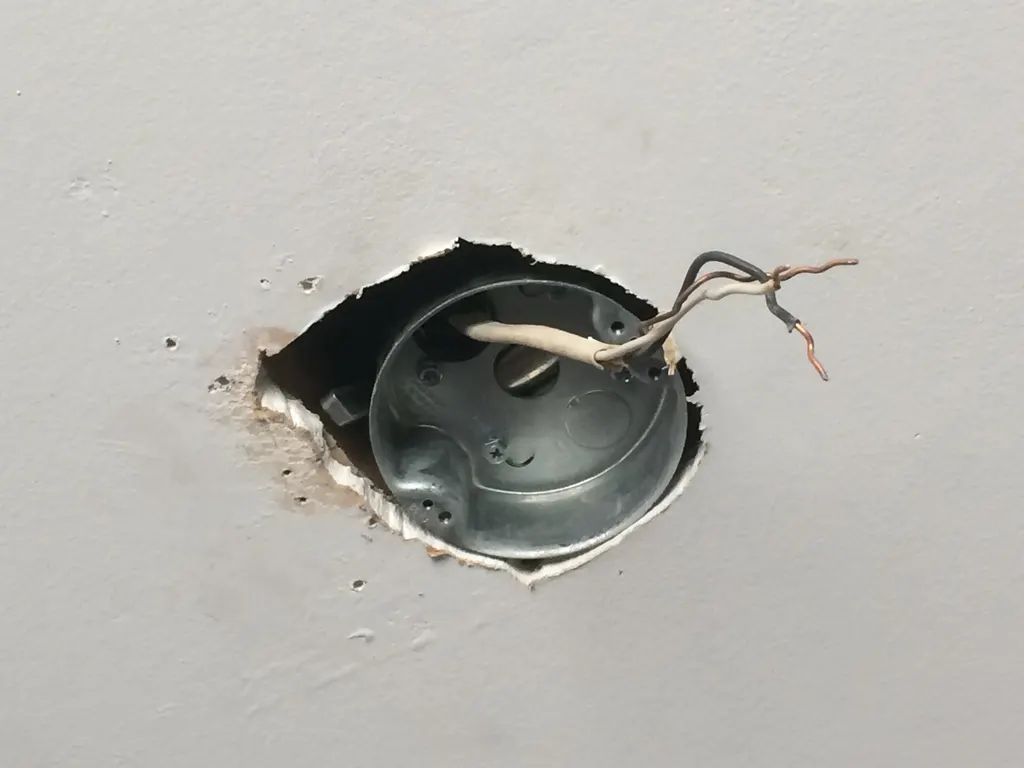
- A box that is not rated for a fan, flexing in the ceiling with every revolution. This one is dangerous.
- Blade tracking. Blades at slightly different heights pull unevenly through the air.
- A damaged motor or bearing, rare, and usually accompanied by noise.
Causes one through five are safe homeowner fixes. Cause six is covered in our post on ceiling box support for fans and should be corrected before the fan runs again.
How Do You Fix Ceiling Fan Wobble? Balancing Step by Step
Work through these in order, with the fan off and a stable ladder, and test on high speed after each step. Most fans are fixed by step three.
- Clean every blade, top and bottom, with a damp cloth.
- Tighten all hardware. Blade-to-iron screws, iron-to-motor screws, the canopy screws, the bracket screws into the box, and the downrod set screws. Push up gently on the motor; it should not shift.
- Check the downrod ball. Loosen the canopy, make sure the ball's groove sits on the bracket tab and the cross pin is through the rod.
- Measure blade heights. Hold a yardstick from the ceiling to the tip of each blade, rotating the fan by hand. All tips should be within about an eighth of an inch. A low blade usually has a bent iron; bend it gently back or swap irons between blades.
- Use a balancing kit. Clip the plastic balancing clip to the trailing edge of one blade halfway out and run the fan. Move the clip to each blade in turn to find the one that helps most, then slide it along that blade to find the right spot. Stick the adhesive weight on top of the blade in line with the clip, and remove the clip.
- Swap adjacent blades if a kit does not settle it; manufacturing variation sometimes pairs two heavy blades together.
If the fan still wobbles after all six steps, the problem is below the blades: the bracket, the box or the motor. That is the point to stop and call us.
Why Is My Ceiling Fan Making Noise?
Different noises point to different parts. Listen with the light off and the fan on each speed.
- Humming or buzzing that changes with speed. The motor is being fed by a standard light dimmer or an incompatible solid-state control. Triac dimmers chop the waveform and make the windings sing; they also overheat the motor. Replace the control with a fan-rated speed control, or leave the wall switch on and use the fan's own remote.
- Humming at low speed only, older fan. A weakening capacitor or dry bearings. Oil ports on older models want a few drops of the specified oil; sealed bearings do not.
- Clicking once per revolution. A blade screw is loose, a blade is touching the light kit or a tag, or a blade iron is cracked.
- Rattling. Loose canopy screws, a loose light-kit glass or shade, or a remote receiver bouncing inside the canopy.
- Grinding or scraping. Bearings failing, or the motor housing rubbing the shroud. Stop using the fan; a seized bearing can overheat the motor.
- A buzz from the switch box. A failing control or a loose connection. If the switch plate is warm, see the wiring section below.
Noise after a storm or power restoration on a DC fan often means the driver board or remote receiver took a hit; transient overvoltage damage to fan electronics is a regular call after Houston-area outages, and a surge protector at the panel prevents the repeat.
Why Does My Ceiling Fan Run Slow or Only on One Speed?
Speed problems are electrical, and the fan type decides where to look.
AC-motor fans with pull chains or wall controls
The speed capacitor is the usual suspect. These fans use a multi-section capacitor to set three speeds; as it ages, one section fails and that speed disappears, or the fan starts slowly and only reaches full speed after a minute. A fan that runs only on high with the chain in any position is the classic symptom. Dry bearings also slow a fan, usually with hum. A pull-chain switch can fail internally and drop a speed as well. Capacitors hold a charge after power is off and the replacement must match the original values, so this is a repair we do rather than one we recommend trying.
DC-motor fans
The remote or app is the control, so the first step is pairing and batteries. If the fan responds to the light but not the speed buttons, or runs erratically, the driver board or receiver is failing. Check that the wall switch feeding the fan is fully on and is a plain switch, not a dimmer. A DC fan on a dimmer will behave unpredictably.
Any fan
Low voltage on a long circuit makes every motor on it run slow and hot; if the lights dim when the air conditioner starts, read our guide to voltage drop and flicker. The reverse switch stuck between positions stops some motors entirely, which is worth checking before anything else.
Fan Speed Controls, Wall Switches and Wiring Faults
A fan's wall control changes the electrical input to set motor speed and torque, and using the wrong one is the single most common cause of fan problems we see after a homeowner remodel. The rules:
- Standard light dimmers are for lights only. On a fan motor they cause hum, heat, speed hunting and early motor failure, and most are not rated for motor loads at all.
- Fan-rated speed controls come in capacitor type (quiet, usually three or four fixed speeds) and electronic type (full range, must be labeled for fan motors). Match the control's amp rating to the fan.
- Combination fan-and-light controls need a three-conductor cable from the switch box to the fan, or a canopy receiver that does the splitting at the fan.
- Smart wall controls need a neutral in the switch box; most 1990s switch loops in our area do not have one.
The warning signs that wiring, not the fan, is the problem: a wall switch that feels warm, a control that buzzes, a fan that changes speed when another load on the circuit turns on, scorching on the switch plate, or a smell at the canopy. Any of those means a loose or overloaded connection. Turn off the breaker for the circuit and leave it off until it is inspected. Our guide to switch and fan wiring mistakes explains the errors we find most, including fans wired through the neutral and shared neutrals that trip AFCI breakers.
Ceiling Fan Problems in Katy and Pearland Homes
The west side and the south side of Houston produce fan faults in slightly different flavors. In Katy, Cinco Ranch and the newer sections of Fulshear, the first-floor ceilings are 10 feet and the family rooms are vaulted, so fans hang on 12 to 36 inch downrods. A long rod amplifies any imbalance at the blades and makes a loose hanger ball obvious. Builder-grade fans in these homes went up fast during construction, and we routinely find under-tightened blade screws and brackets held by only two of four screws.
In Pearland, Friendswood and the Shadow Creek Ranch area, humidity is the recurring factor. Covered patio fans with wood-composite blades absorb moisture and warp within a season, and the fix is a damp- or wet-rated fan rather than another balancing kit. Indoors, the humidity that gets into the house during Gulf storms does the same thing more slowly.
Across both areas, attics running above 130°F in summer dry out bearings and harden the insulation on fan leads, and the 1990s and early-2000s subdivisions have thousands of fans hanging from boxes that were never fan-rated. We also see a surge-related pattern: after the May 2024 derecho and Hurricane Beryl, The Local Electrician replaced a steady run of DC fan receivers and driver boards that had survived the storm and died when CenterPoint restored power. A whole-home surge protector is the inexpensive answer for homes full of electronic fans.
What You Can Fix Yourself and When to Call a Licensed Electrician
Homeowner territory, with the fan switched off and a stable ladder: cleaning, tightening hardware, seating the downrod ball, measuring and swapping blades, using a balancing kit, replacing a pull-chain switch of the same rating, changing remote batteries and re-pairing a receiver.
Call The Local Electrician when:
- The fan still wobbles after cleaning, tightening and balancing, or the box moves when the motor is pushed.
- A wall switch or control is warm, buzzing or scorched, or there is any burning smell.
- The fan needs a capacitor, a receiver or a driver board, or the motor grinds.
- You want the dimmer replaced with a proper fan control, separate fan and light switching, or a smart control, which may involve new wiring.
- The fan is on a ceiling over 10 feet or above a stairwell.
- The problem started after a storm or outage and other electronics were affected.
What affects the cost of a fan repair: whether parts such as a capacitor or receiver are needed, whether the ceiling box must be replaced, ceiling height and access, and whether rewiring the switch loop is part of the fix. On an inexpensive builder-grade fan that needs a capacitor and a box, replacing the fan with a better one is often the smarter spend, and we will say so. Repairs and replacements are quoted up front, and larger multi-room projects can use our financing options. Call 832-271-1167 to schedule in Katy, Pearland or anywhere across our Houston-area service territory.
Frequently Asked Questions
What causes a ceiling fan to wobble?
Loose blade screws, dust on the blades, a bent blade iron, a downrod hanger ball that is not seated, loose set screws, a loose mounting bracket, or a ceiling box that is not rated for a fan and is flexing. Blades at different heights and a worn motor bearing are less common. Work through cleaning, tightening and balancing first; a wobble that remains usually means the box is moving.
How does ceiling fan balancing reduce noise?
An unbalanced fan vibrates with every revolution, and that vibration rattles the canopy, the light-kit glass and any loose screw, and loads the motor bearings unevenly so they wear and hum sooner. Balancing removes the vibration at its source. Cleaning and tightening alone silence most clicking and rattling; the weight kit handles the remaining shimmer at high speed.
Can I balance a ceiling fan myself?
Yes. With the fan off, clean the blades, tighten every screw, confirm the downrod ball is seated, measure blade tip heights with a yardstick, then use the clip-and-weight balancing kit on one blade at a time. If the fan still wobbles, or the motor moves when you push up on it, stop and have the mounting box checked, since a loose box is a falling hazard.
What tools are needed for ceiling fan balancing?
A stable stepladder, a screwdriver or nut driver for the blade and bracket screws, a hex key for downrod set screws, a damp cloth, a yardstick or tape to measure blade heights, and a balancing kit with a clip and adhesive weights, which usually comes in the fan's box and is sold at any hardware store. No electrical tools are needed for balancing.
How often should I check my fan for balance?
Clean the blades every month or two during the running season and watch for a new shimmer. Once a year, tighten all hardware and re-check blade heights. Outdoor fans need checking more often because humidity swells and warps the blades. Any sudden wobble after a bump from a ladder, a move of the fan, or a storm deserves an immediate look.
Why is my ceiling fan humming at low speed with the wall control?
The control is almost certainly a light dimmer or a cheap electronic control that chops the AC waveform, which makes the motor windings vibrate audibly and run hot. Replace it with a capacitor-type or fan-rated speed control matched to the fan's amp rating, or set the wall switch to on and use the fan's remote. On an older fan, a weakening capacitor or dry bearings can also hum at low speed.
Could a warm wall switch mean a wiring problem?
Yes. A switch or fan control that is warm to the touch, buzzes or shows discoloration has a loose or overloaded connection, or is a dimmer carrying a motor load it was never rated for. Turn off the breaker for that circuit and leave it off. The Local Electrician will open the box, correct the connection and install a properly rated control; loose connections are a common cause of electrical fires.